Powerful Video Analysis
Built for Basketball Coaches
How it works
Record, tag, review, present, and everything in between.
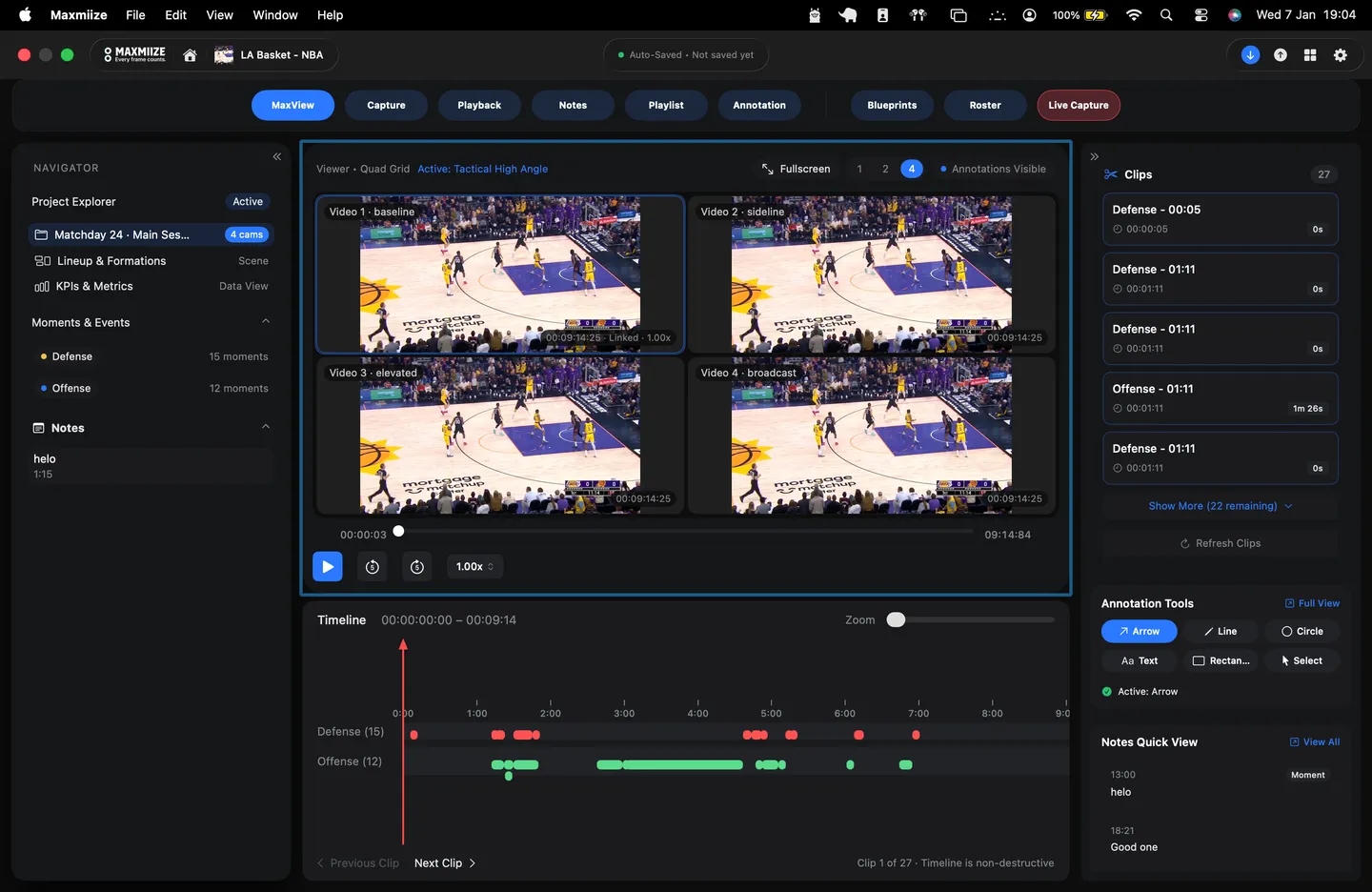
Maxmiize carries a game through the complete coaching workflow: every camera angle recorded, moments tagged as they happen, film annotated frame by frame, and playlists built for the team. This is a look at some of it in action.
Bring Your Games Together: Add multiple games to a single analysis and move between them from one workspace.
Bring Every Angle Together: Add multiple camera angles to each game and keep them connected throughout your analysis.
Keep Your Video In Sync: Keep your camera angles aligned so you can move through each game without losing the moment.
Start Analyzing Immediately: Go from your video to your analysis workflow without complicated setup or file management.
Build Your Blueprint: Create a simple structure for the actions, players, situations, and moments you want to capture.
Capture What Matters: Use your Blueprint to quickly identify and tag the moments that matter as you analyze the game.
Organize Your Moments: Build a searchable collection of moments that you can revisit, analyze, and use throughout your workflow.
Find Exactly What You Need: Search, filter, and cross-reference your coded data to quickly isolate the clips that matter.
Analyze Every Detail: Slow down, speed up, trim, add layers and notes, and examine each possession from every angle.
Organize Your Best Clips: Star important moments, reorder clips, and build the sequence you want to review or present.
Turn Analysis Into Presentation: Present your clips directly from Playback and keep your analysis, video, and teaching points together.
Draw Directly on the Play: Use visual tools to highlight spacing, movement, positioning, and decisions.
Show What the Video Doesn't Say: Add visual context that makes your coaching points clear and easy to understand.
Build the Teaching Moment: Combine drawings, text, and notes to explain exactly what you want players to see.
Give Every Clip Purpose: Turn your selected clips into a focused teaching sequence built around what you want your players to see.
Refine Every Detail: Trim clips, edit notes, and make final adjustments so every moment supports your message.
Add Context: Bring in annotations, slides, photos, videos, and notes to give your players the complete picture.
Finalize Your Presentation: Organize everything into a polished playlist that's ready to present to your team.
Code as the Game Happens: Capture and tag possessions in real time so your game is already organized when the final whistle blows.
Bring the Game In Live: Connect a live camera feed to Maxmiize and keep your video connected to your real-time coding.
Capture the Moments That Matter: Mark important moments in real time and turn them into clips you can review, analyze, and share.
Start Analyzing Immediately: Go straight from the final possession into your analysis, with your video and coding already connected.
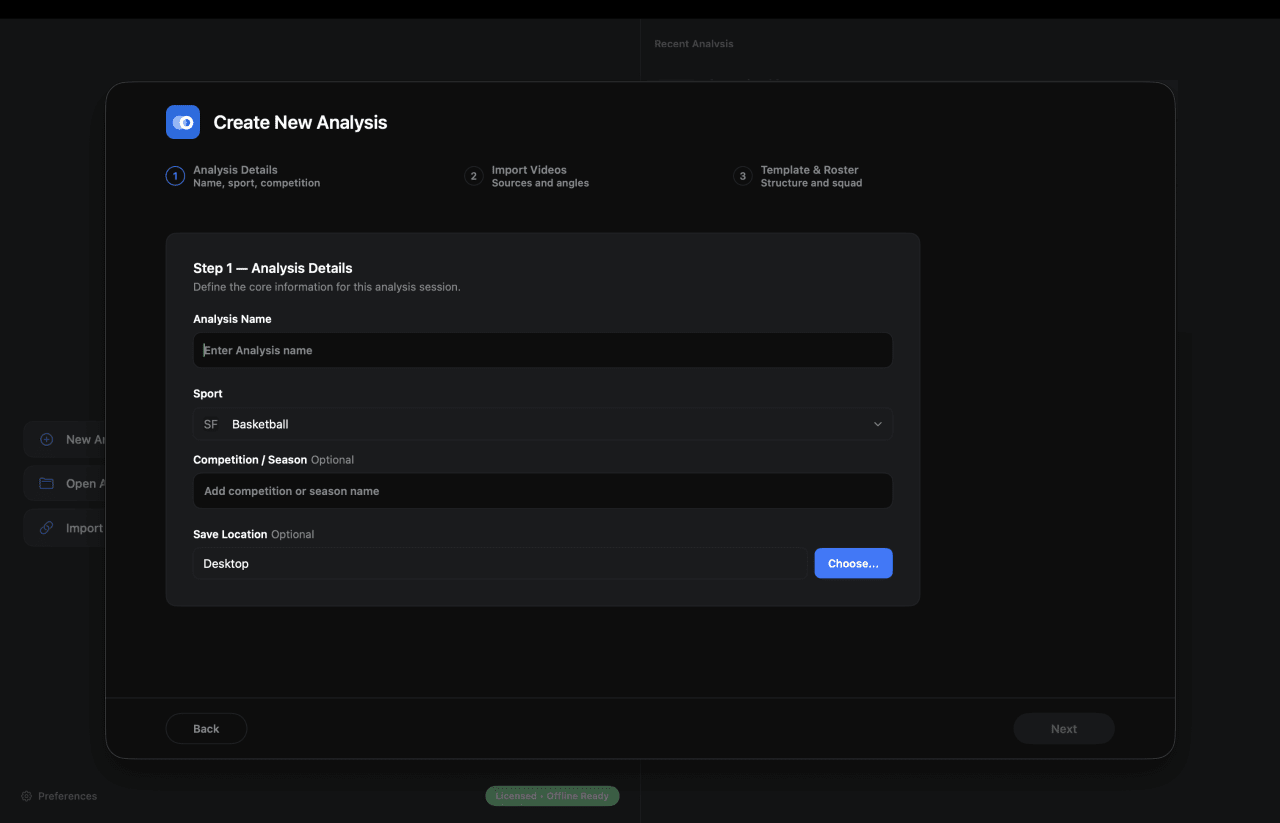
Bring Your Games Together: Add multiple games to a single analysis and move between them from one workspace.
Bring Every Angle Together: Add multiple camera angles to each game and keep them connected throughout your analysis.
Keep Your Video In Sync: Keep your camera angles aligned so you can move through each game without losing the moment.
Start Analyzing Immediately: Go from your video to your analysis workflow without complicated setup or file management.
Everything runs on your Mac and works offline. Start with a free 7-day trial in the app, no card needed.
Choose the plan that fits your program
Simple pricing per seat, whether you break down film once a week or every night.
Basic (iPad)
Built for the court.
Analyze, code, and create film wherever you work.
Save $149/year
Features included
- Multi-angle recording: HDMI, USB, or iPhone
- Frame-accurate playback, 0.25x to 6x
- Blueprint tagging with custom hotkeys
- Touch-based tagging
- Apple Pencil support
- Live courtside workflow (on iPad)
- Annotation tools with court overlays
- Playlists with per-clip trim and MP4 export
- SportsCode XML import and export
- Roster and lineup management
- Works fully offline
- AI-assisted game breakdown
- Live Capture and coding
- Multi-level notes: moments, layers, and players.
- Create multiple timelines
- Multi-level sort, filter and search
- Automatic tagging
- Player detection
- Live drawing on clips
- Use on 1 iPad per seat
Pro (Desktop)
Built for the film room.
Advanced analysis tools for coaches who break down film every day.
Save $269/year
Features included
- Multi-angle recording: HDMI, USB, or iPhone
- Frame-accurate playback, 0.25x to 6x
- Blueprint tagging with custom hotkeys
- Touch-based tagging
- Apple Pencil support
- Live courtside workflow (on iPad)
- Annotation tools with court overlays
- Playlists with per-clip trim and MP4 export
- SportsCode XML import and export
- Roster and lineup management
- Works fully offline
- AI-assisted game breakdown
- Live Capture and coding
- Multi-level notes: moments, layers, and players.
- Create multiple timelines
- Multi-level sort, filter and search
- Automatic tagging
- Player detection
- Live drawing on clips
- Use on 1 Mac per seat
Elite (Desktop + AI)
Built for the next level.
Everything in Pro, plus AI-powered analysis.
Save $389/year
Features included
- Multi-angle recording: HDMI, USB, or iPhone
- Frame-accurate playback, 0.25x to 6x
- Blueprint tagging with custom hotkeys
- Touch-based tagging
- Apple Pencil support
- Live courtside workflow (on iPad)
- Annotation tools with court overlays
- Playlists with per-clip trim and MP4 export
- SportsCode XML import and export
- Roster and lineup management
- Works fully offline
- AI-assisted game breakdown
- Live Capture and coding
- Multi-level notes: moments, layers, and players.
- Create multiple timelines
- Multi-level sort, filter and search
- Automatic tagging
- Player detection
- Live drawing on clips
- Use on 1 Mac per seat
Try Maxmiize free for 7 days.
Explore Basic (iPad) or Pro (Desktop) and see which workflow fits you best, before you pay.
Basic (iPad)
Built for the court.
Analyze, code, and create film wherever you work.
Save $149/year
Pro (Desktop)
Built for the film room.
Advanced analysis tools for coaches who break down film every day.
Save $269/year
Elite (Desktop + AI)
Built for the next level.
Everything in Pro, plus AI-powered analysis.
Save $389/year
Free for 7 days · No credit card required · Cancel anytime
Frequently asked questions.
The questions coaches ask us most, answered.
Create your account from the Sign in link at the top of this page, then choose Create account. You'll need an email address and a password; we send a verification link to confirm the address before your account goes live.
You can also sign in with Apple if you'd rather not manage another password. If you later want a password as well, you can set one from your account settings in the coach portal.
Still stuck? Send us a note and we'll reply.
See all questionsBook a demo
See Maxmiize in action.
A live walkthrough with the team: recording, tagging, and the film session, on your own footage if you like. Pricing and team questions welcome.
Not ready for a call? Join the waitlist and we'll email you when Maxmiize goes live.